
TG Pro Now Supports M5, M5 Pro, and M5 Max Macs with Temperature Monitoring and Fan Control
20/03/26 13:27

TG Pro is now ready for Apple’s latest generation of Apple silicon, with full support for monitoring temperatures and controlling fans on M5, M5 Pro, and M5 Max Macs.
With the latest updates from version 2.100 through 2.103, TG Pro adds full compatibility with the newest Macs, along with a range of improvements and fixes.
Full Support for the M5 Family
TG Pro now fully supports the latest Macs powered by the M5 family, including:
- MacBook Air (M5)
- MacBook Pro (M5 Pro & M5 Max)
- MacBook Neo (A18 Pro)
Monitoring Performance and Temperature
The M5 chips deliver significant performance gains, especially on the Pro and Max models. Under sustained workloads, that performance translates directly into higher thermal output.
Monitoring temperatures on M5-based Macs is especially important during sustained workloads such as video editing, compiling code, or gaming. TG Pro provides detailed insight into how these systems behave under load, helping identify thermal throttling and manage heat more effectively.
TG Pro provides visibility into that behavior in real time, including:
- CPU and GPU temperatures
- System-wide thermal trends
- Fan speeds (on supported models)
Under Load
Even highly efficient systems can run hot under sustained workloads.
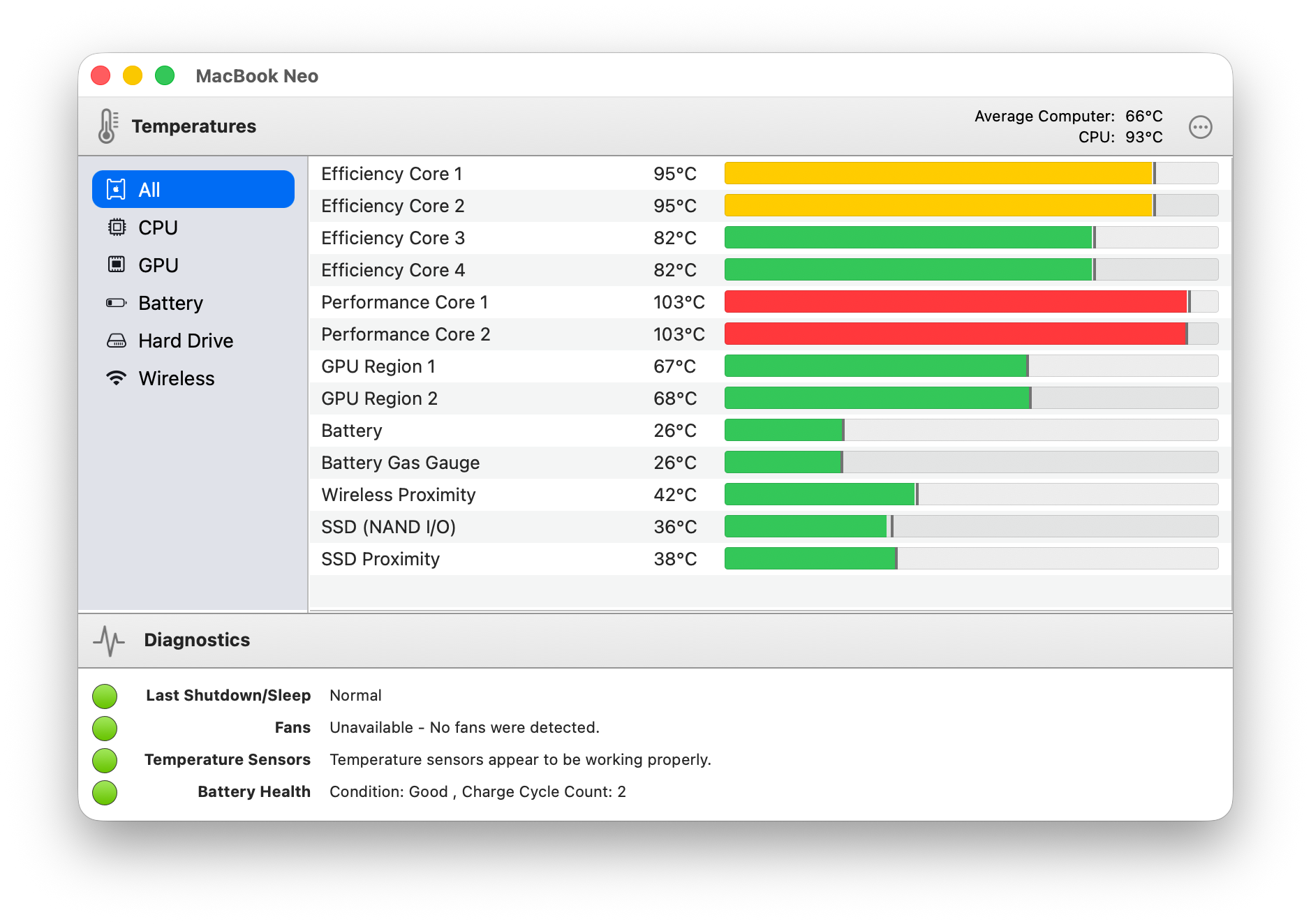
TG Pro on MacBook Neo (A18 Pro) showing elevated CPU temperatures without active cooling.
Monitoring remains valuable even on thinner or fanless designs, providing real-time insight into performance, thermal limits, and overall system behavior.
Available Now
Support for M5, M5 Pro, and M5 Max Macs is available now in TG Pro 2.103, released March 19, 2026. This release also includes additional improvements and fixes to enhance overall reliability and performance.
Full release notes are available here.
TG Pro is continuously updated for the latest Macs and macOS, with more improvements coming soon.
Comments
TG Pro + Techtool Pro: A Powerful Mac Maintenance Duo
02/05/25 09:23
Learn how combining TG Pro and Techtool Pro creates a complete Mac maintenance setup, with real-time temperature monitoring, fan control, and advanced diagnostics to keep systems running smoothly. Read More…
Fan Control Comes to M4 Macs in TG Pro 2.97
26/03/25 20:41
Fan control support arrives for M4 Macs in TG Pro 2.97, bringing full manual and automatic control, improved cooling under load, and continued temperature monitoring across all models. Read More…
TG Pro: Advanced Temperature Monitoring for Apple's M3 series
21/11/23 16:58
TG Pro version 2.88 introduces comprehensive support for Apple’s M3, M3 Pro, and M3 Max Macs, delivering precise temperature monitoring and fan control. This update addresses challenges such as complex sensor mapping, diverse model configurations, and hardware-controlled fan activation, ensuring accurate thermal management across the M3 series. Read More…
TG Pro 2.84 Fully Embraces macOS 14 Sonoma: Enhanced Temperature and Fan Monitoring
07/10/23 08:00
TG Pro 2.84 now fully supports macOS 14 Sonoma, offering enhanced monitoring of critical temperatures such as CPU, GPU, SSD and more, along with fan speeds. With full fan control, hardware diagnostics, notifications, logging, and more, experience an elevated level of insight into your Mac's thermal performance and overall health on the latest macOS platform. Read More…
TG Pro: Now Supporting Apple Silicon Mac Pro, 15-inch MacBook Air, and Mac Studio
04/07/23 13:38
TG Pro 2.82 introduces full support for the latest Mac models, including the Apple Silicon Mac Pro with M2 Ultra, 15-inch MacBook Air, and Mac Studio with M2 chips, along with other important improvements. Read More…
Create QR codes for contacts using QR Factory 3
05/03/23 11:32
QR codes have become an increasingly popular way to share information quickly and easily, particularly in situations where it may be difficult or impractical to exchange information using more traditional methods such as email or physical business cards.
Creating a QR code for a contact that includes their vCard information is particularly useful because it allows the recipient to easily import the contact information directly into their address book or contact management system. This can save time and reduce the likelihood of errors or typos when manually entering contact information.
QR codes can also be used in a variety of contexts, from personal networking to professional events, to facilitate the exchange of information with potential clients, partners, or colleagues. They can be printed on business cards, displayed on websites, or shared via email or social media, making it easy to distribute contact information quickly and efficiently.
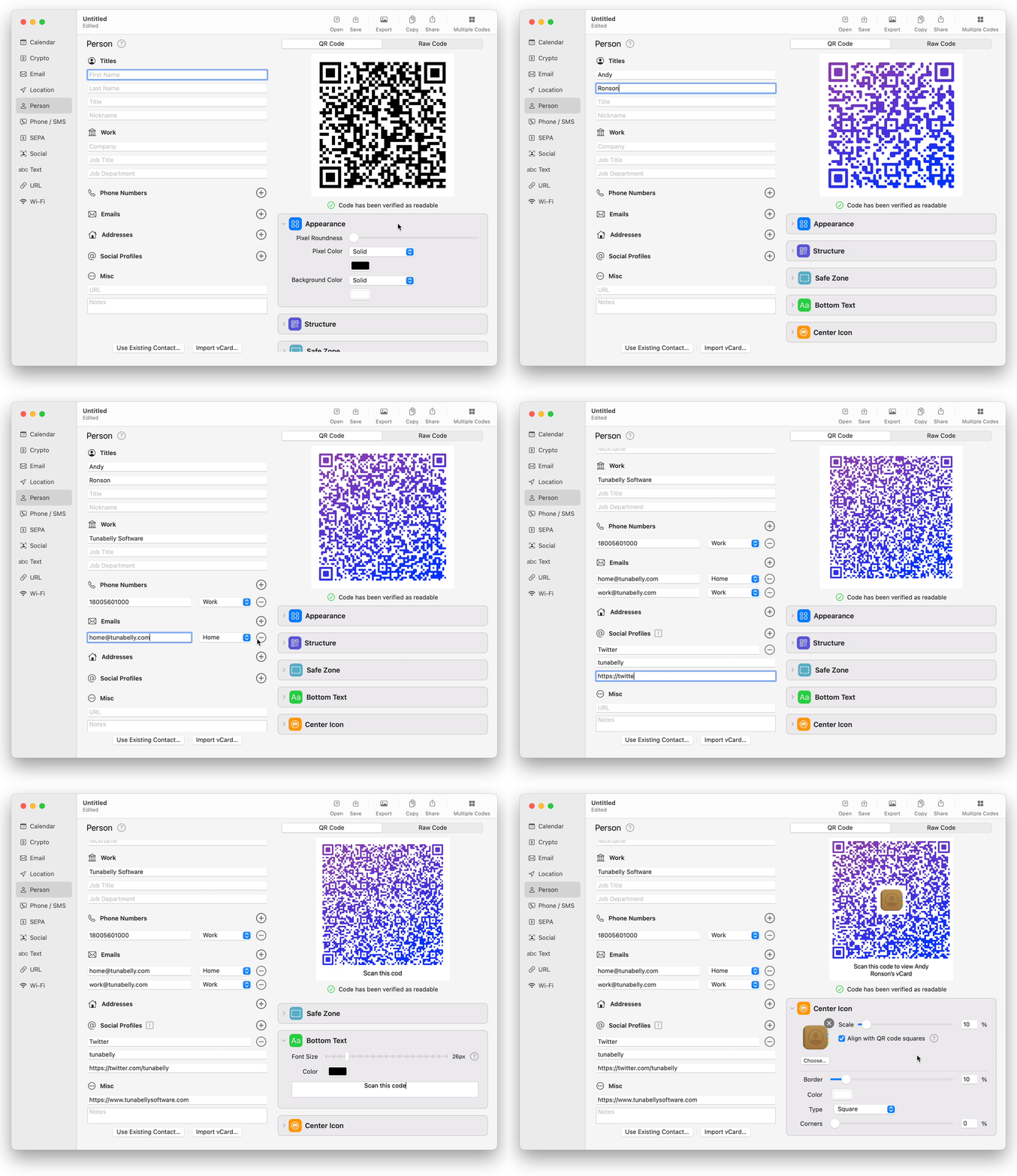
Using QR Factory 3, it's incredibly easy to create them and even include multiple emails, phone numbers, postal addresses and social profiles. It supports adding in all the fields one at a time, or using an existing contact that's already in the system (either macOS or iPadOS).
In addition, it has many other common types of QR codes templates built-in, along with the option to create multiple codes using a simple CSV file.
Download QR Factory 3 from the App Store today for either macOS or iPadOS and enjoy all the features for free for 7 days.
Creating a QR code for a contact that includes their vCard information is particularly useful because it allows the recipient to easily import the contact information directly into their address book or contact management system. This can save time and reduce the likelihood of errors or typos when manually entering contact information.
QR codes can also be used in a variety of contexts, from personal networking to professional events, to facilitate the exchange of information with potential clients, partners, or colleagues. They can be printed on business cards, displayed on websites, or shared via email or social media, making it easy to distribute contact information quickly and efficiently.
Using QR Factory 3, it's incredibly easy to create them and even include multiple emails, phone numbers, postal addresses and social profiles. It supports adding in all the fields one at a time, or using an existing contact that's already in the system (either macOS or iPadOS).
In addition, it has many other common types of QR codes templates built-in, along with the option to create multiple codes using a simple CSV file.
Download QR Factory 3 from the App Store today for either macOS or iPadOS and enjoy all the features for free for 7 days.
M2 Pro & M2 Max: Fan control and temps with TG Pro
05/03/23 11:25
TG Pro 2.78 now supports the M2 Pro & M2 Max chips in the new MacBook Pro and Mac mini, with full temperature monitoring and fan control, overcoming challenges in temperature reporting for low CPU usage. The update also includes various minor fixes and improvements. Read More…
Ready for macOS 13 Ventura
18/11/22 16:34
All of our apps are fully compatible with the new macOS 13 Ventura. Read More…
MacBook Pro M2 gains support for CPU, GPU temperatures & fan control
27/06/22 11:08
TG Pro has been updated to version 2.70 to fully support the new MacBook Pro M2. Read More…
How to keep the Mac Studio fans quiet
14/04/22 10:11
Learn how to use TG Pro to keep the Mac Studio fans to a minimum so they stay nice and quiet! Read More…
Mac Studio gets temperature monitoring & fan control
19/03/22 20:20
TG Pro now supports the new Mac Studio models, including both the M1 Max and M1 Ultra versions. Temperatures such as CPU, GPU, memory, Thunderbolt ports and many more are available along with fan speeds and full control. Read More…
Temperature monitoring & fan control for M1 Pro / M1 Max MacBook Pros
27/10/21 20:45
TG Pro now supports the 14-inch and 16-inch MacBook Pros with temperature monitoring for over 30 sensors, along with fan speeds and full fan control, plus many more features. Read More…
View CPU/GPU temperatures, fan speeds, battery health and more with TG Pro
13/10/21 15:27
View CPU/GPU temperatures, fan speeds, battery health and more with TG Pro. Read More…
Fan control & temperature monitor for M1 iMac
09/06/21 09:34
TG Pro now supports the 24-inch M1 iMac with temperature monitoring including specific ones to the iMac such as the LCD panel and power supply. Read More…
Fan control for M1 (Apple Silicon) Macs
30/11/20 11:22
TG Pro now supports the Apple Silicon based Macs with the M1 processor! This includes the new MacBook Pro, MacBook Air and Mac mini. Read More…
macOS 11 at WWDC 2020?
21/06/20 09:47
We think there will be some massive changes in macOS coming… Read More…
Fan control for 15 and 16-inch 2019 MacBook Pros
22/11/19 16:01
TG Pro now supports both the 15-inch and 16-inch 2019 MacBook Pros with over 30 temperature sensors shown and full fan control. Read More…
Our apps are safe from CVE-2019-13013
28/08/19 12:48
TG Pro & Disk Diet have both been updated to close the potential privilege escalation. Read More…
Fan control for 2018 MacBook Pros
06/03/18 20:04
TG Pro now supports fan control and temperature monitoring for the 2018 MacBook Pros. Cool down that hot Core i7 or i9 processor with one click. Read More…
Fan control for the iMac Pro
06/03/18 20:04
Got a new iMac Pro? TG Pro now supports fan control and temperature monitoring. Read More…
Apple will probably use A11 Bionic chip in a MacBook
16/09/17 10:04
We really believe that Apple will use a A11 Bionic chip (or a successor) in a MacBook soon. Read More…
6 things Apple should change on the Mac App Store
09/09/17 16:42
The Mac App Store can be a great way to find apps although it has a lot of issues that developers would like to see fixed. Read on to find out what we think they are. Read More…
Our apps are ready for macOS Sierra (10.12)
07/10/16 15:36
All of Tunabelly's Mac apps are ready for the new macOS Sierra - get tips on how to update and makes sure your license keys migrate on a fresh install. Read More…
Will Apple use an A10 chip in the next MacBook?
13/09/16 14:16
Will the switch to an A10/A10X CPU happen in a 2017 MacBook? Read More…
Xcode - use incrementing buid numbers
26/02/16 21:40
Make your development life easier with incrementing build numbers for your Mac and iOS projects. Read More…
TG Pro app tutorial updated for 2.9.7
08/02/16 21:01
Includes explanation of all sensor types, fan control modes, forcing a fan to a lower speed and how to fix a nosy fan in an iMac. Read More…
What does the iPad Pro mean for MacBooks and OS X?
10/09/15 18:09
With the introduction of the new iPad Pro, will people still want a MacBook Pro with OS X? Read More…
Will the desktop disappear in OS X 10.11?
05/06/15 20:24
The concept of the Mac desktop has been around since 1984. Will it leave with OS X 10.11? Read More…
What helps to make a great developer?
01/06/15 20:40
Find out one key thing that every developer should be doing. Read More…
Our apps are being pirated
07/05/15 20:18
Piracy is common place for any digital format (apps, movies, songs, etc). See an example about one of Tunabelly's Mac apps. Read More…
Developing for the Mac App Store
05/04/15 09:37
People have asked me what I do for a living and when I tell them I write apps they immediately think about the iOS App Store... Read More…