The Sweet Bits
TG Pro: The Mac cooling tool you need
Read the reviewSee temperatures across your Mac, check fan speeds, and adjust cooling manually or automatically. TG Pro keeps the details easy to access, right from your menu bar.
One-time payment. No subscription.
Intel & Apple Silicon · macOS 10.14 to macOS 27


Set Auto Boost rules for CPU, GPU, drive, or other sensor temperatures. Choose a temperature threshold and fan speed for each rule, and TG Pro adjusts the fans automatically.
Explore fan control in the User Guide
When you want more immediate cooling, adjust fan speeds manually or use Max to increase them straight away.
Manual and Max options depend on your Mac model and settings.
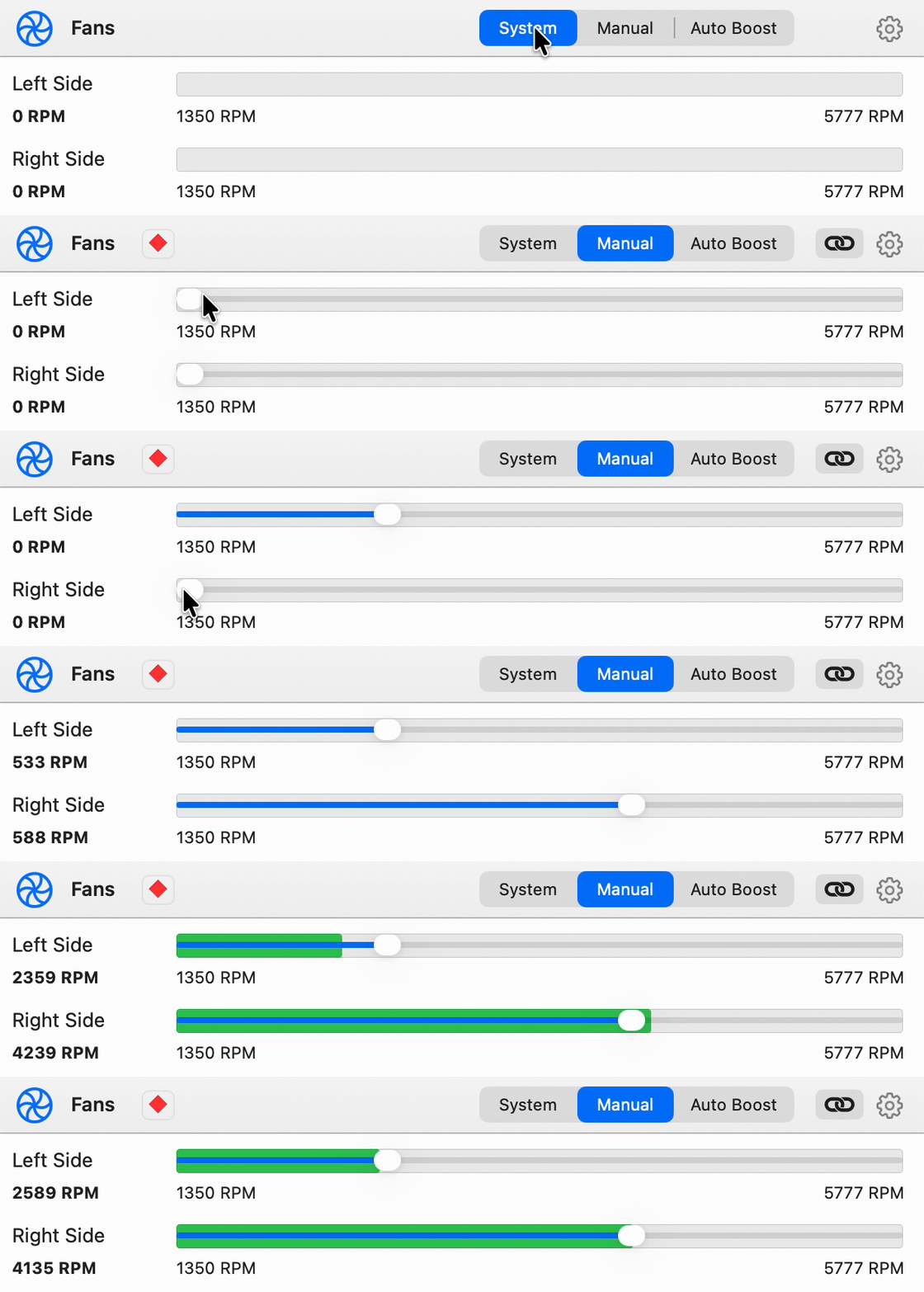
Fanless Macs can monitor temperatures. Fan controls are available on models with fans.
Get a clear view of temperatures across your Mac, with current readings and the highest temperature recorded for each sensor.

Check fan and sensor status, battery health, and the last shutdown or sleep. Status indicators highlight anything that needs attention.

Swipe or scroll to view the full diagnostics panel.
Choose how TG Pro keeps you informed, with on-screen notifications, email alerts, and CSV logs.

Set temperature limits for macOS notifications. Notifications can also flag unusual shutdowns and hardware diagnostic results.
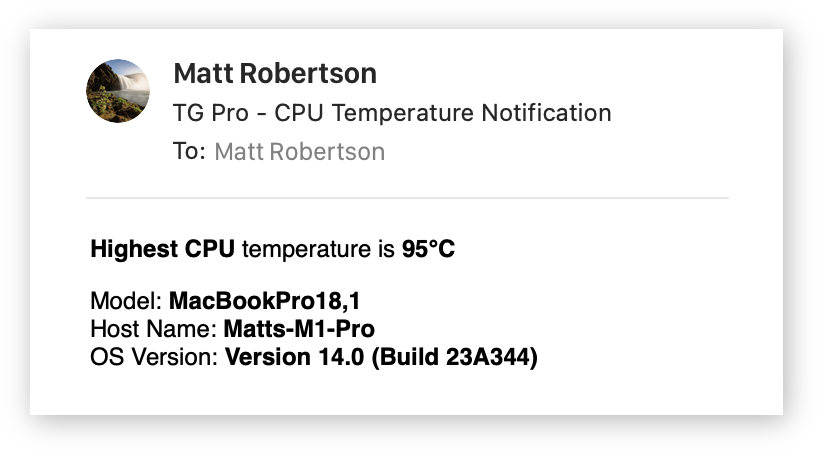
Get alerts by email, with system information to help explain what happened.
Log temperatures, fan speeds, and diagnostic information to CSV for later review.
TG Pro runs natively on Intel and Apple Silicon Macs, including Intel models with the T2 security chip. Supports macOS 10.14 to macOS 27.
Choose a Mac family to see model names and identifiers. Some older models require a previous TG Pro release and a compatible version of macOS.
| Model | Identifier |
|---|---|
| Mac Studio (M5 Ultra, 2026) | Mac17,15 |
| Mac Studio (M5 Max, 2026) | Mac17,14 |
| Mac Studio (M4 Max, 2025) | Mac16,9 |
| Mac Studio (M3 Ultra, 2025) | Mac15,14 |
| Mac Studio (M2 Ultra, 2023) | Mac14,14 |
| Mac Studio (M2 Max, 2023) | Mac14,13 |
| Mac Studio (M1 Ultra, 2022) | Mac13.2 |
| Mac Studio (M1 Max, 2022) | Mac13,1 |
| Model | Identifier |
|---|---|
| MacBook Neo (A18 Pro, 2026) | Mac17,5 |
| Model | Identifier |
|---|---|
| MacBook (Retina, 12-inch, 2017) | MacBook10,1 |
| MacBook (Retina, 12-inch, Early 2016) | MacBook9,1 |
| MacBook (Retina, 12-inch, Early 2015) | MacBook8,1 |
| MacBook (13-inch, Mid 2010) | MacBook7,1 |
| MacBook (13-inch, Late 2009) | MacBook6,1 |
| MacBook (13-inch, Mid 2009) | MacBook5,2 |
| MacBook (13-inch, Early 2009) | MacBook5,2 |
| Model | Identifier |
|---|---|
| MacBook Pro (14-inch, 2026, M5 Pro) | Mac17,9 |
| MacBook Pro (16-inch, 2026, M5 Pro) | Mac17,8 |
| MacBook Pro (14-inch, 2026, M5 Max) | Mac17,7 |
| MacBook Pro (16-inch, 2026, M5 Max) | Mac17,6 |
| MacBook Pro (14-inch, 2025, M5) | Mac17,2 |
| MacBook Pro (14-inch, 2024, M4 Pro) | Mac16,8 |
| MacBook Pro (16-inch, 2024, M4 Pro) | Mac16,7 |
| MacBook Pro (14-inch, 2024, M4 Max) | Mac16,6 |
| MacBook Pro (16-inch, 2024, M4 Max) | Mac16,5 |
| MacBook Pro (14-inch, 2024, M4) | Mac16,1 |
| MacBook Pro (16-inch, Nov 2023, M3 Max) | Mac15,11 |
| MacBook Pro (16-inch, Nov 2023, M3 Max) | Mac15,9 |
| MacBook Pro (16-inch, Nov 2023, M3 Pro) | Mac15,7 |
| MacBook Pro (14-inch, Nov 2023, M3 Max) | Mac15,10 |
| MacBook Pro (14-inch, Nov 2023, M3 Max) | Mac15,8 |
| MacBook Pro (14-inch, Nov 2023, M3 Pro) | Mac15,6 |
| MacBook Pro (14-inch, Nov 2023, M3) | Mac15,3 |
| MacBook Pro (16-inch, 2023, M2 Max) | Mac14,10 |
| MacBook Pro (16-inch, 2023, M2 Pro) | Mac14,6 |
| MacBook Pro (14-inch, 2023, M2 Max) | Mac14,9 |
| MacBook Pro (14-inch, 2023, M2 Pro) | Mac14,5 |
| MacBook Pro (13-inch, 2022, M2) | Mac14,7 |
| MacBook Pro (16-inch, 2021, M1 Max) | MacBookPro18,2 |
| MacBook Pro (16-inch, 2021, M1 Pro) | MacBookPro18,1 |
| MacBook Pro (14-inch, 2021, M1 Max) | MacBookPro18,4 |
| MacBook Pro (14-inch, 2021, M1 Pro) | MacBookPro18,3 |
| MacBook Pro (13-inch, 2020, M1) | MacBookPro17,1 |
| MacBook Pro (16-inch, 2020, Radeon 5600M) | MacBookPro16,4 |
| MacBook Pro (13-inch, 2020, Two Thunderbolt 3 ports) | MacBookPro16,3 |
| MacBook Pro (13-inch, 2020, Four Thunderbolt 3 ports) | MacBookPro16,2 |
| MacBook Pro (16-inch, 2019) | MacBookPro16,1 |
| MacBook Pro (13-inch, 2019, Two Thunderbolt 3 ports) | MacBookPro15,4 |
| MacBook Pro (15-inch, 2019) | MacBookPro15,1 & MacBook Pro 15,3 |
| MacBook Pro (13-inch, 2019, Four Thunderbolt 3 ports) | MacBookPro15,2 |
| MacBook Pro (15-inch, 2018) | MacBookPro15,1 |
| MacBook Pro (13-inch, 2018, Four Thunderbolt 3 ports) | MacBookPro15,2 |
| MacBook Pro (15-inch, 2017) | MacBookPro14,3 |
| MacBook Pro (13-inch, 2017, Four Thunderbolt 3 ports) | MacBookPro14,2 |
| MacBook Pro (13-inch, 2017, Two Thunderbolt 3 ports) | MacBookPro14,1 |
| MacBook Pro (15-inch, 2016) | MacBookPro13,3 |
| MacBook Pro (13-inch, 2016, Four Thunderbolt 3 ports) | MacBookPro13,2 |
| MacBook Pro (13-inch, 2016, Two Thunderbolt 3 ports) | MacBookPro13,1 |
| MacBook Pro (Retina, 15-inch, Mid 2015) | MacBookPro11,4 |
| MacBook Pro (Retina, 15-inch, Mid 2015) | MacBookPro11,5 |
| MacBook Pro (Retina, 13-inch, Early 2015) | MacBookPro12,1 |
| MacBook Pro (Retina, 15-inch, Mid 2014) | MacBookPro11,2 |
| MacBook Pro (Retina, 15-inch, Mid 2014) | MacBookPro11,3 |
| MacBook Pro (Retina, 13-inch, Mid 2014) | MacBookPro11,1 |
| MacBook Pro (Retina, 15-inch, Late 2013) | MacBookPro11,2 |
| MacBook Pro (Retina, 15-inch, Late 2013) | MacBookPro11,3 |
| MacBook Pro (Retina, 15-inch, Early 2013) | MacBookPro10,1 |
| MacBook Pro (Retina, 13-inch, Late 2013) | MacBookPro11,1 |
| MacBook Pro (Retina, 13-inch, Early 2013) | MacBookPro10,2 |
| MacBook Pro (Retina, 15-inch, Mid 2012) | MacBookPro10,1 |
| MacBook Pro (15-inch, Mid 2012) | MacBookPro9,1 |
| MacBook Pro (Retina, 13-inch, Late 2012) | MacBookPro10,2 |
| MacBook Pro (13-inch, Mid 2012) | MacBookPro9,2 |
| MacBook Pro (17-inch, Late 2011) | MacBookPro8,3 |
| MacBook Pro (17-inch, Early 2011) | MacBookPro8,3 |
| MacBook Pro (15-inch, Late 2011) | MacBookPro8,2 |
| MacBook Pro (15-inch, Early 2011) | MacBookPro8,2 |
| MacBook Pro (13-inch, Late 2011) | MacBookPro8,1 |
| MacBook Pro (13-inch, Early 2011) | MacBookPro8,1 |
| MacBook Pro (17-inch, Mid 2010) | MacBookPro6,1 |
| MacBook Pro (15-inch, Mid 2010) | MacBookPro6,2 |
| MacBook Pro (13-inch, Mid 2010) | MacBookPro7,1 |
| MacBook Pro (17-inch, Mid 2009) | MacBookPro5,2 |
| MacBook Pro (17-inch, Early 2009) | MacBookPro5,2 |
| MacBook Pro (15-inch, Mid 2009) | MacBookPro5,3 |
| MacBook Pro (15-inch, 2.53GHz, Mid 2009) | MacBookPro5,4 |
| MacBook Pro (13-inch, Mid 2009) | MacBookPro5,5 |
| MacBook Pro (15-inch, Late 2008) | MacBookPro5,1 |
| MacBook Pro (17-inch, Early 2008) | MacBookPro4,1 |
| MacBook Pro (15-inch, Early 2008) | MacBookPro4,1 |
| Model | Identifier |
|---|---|
| MacBook Air (15-inch, M5, 2026) | Mac17,4 |
| MacBook Air (13-inch, M5, 2026) | Mac17,3 |
| MacBook Air (15-inch, M4, 2025) | Mac16,13 |
| MacBook Air (13-inch, M4, 2025) | Mac16,12 |
| MacBook Air (15-inch, M3, 2024) | Mac15,13 |
| MacBook Air (13-inch, M3, 2024) | Mac15,12 |
| MacBook Air (15-inch, M2, 2023) | Mac14,15 |
| MacBook Air (M2, 2022) | Mac14,2 |
| MacBook Air (M1, 2020) | MacBookAir10,1 |
| MacBook Air (Retina, 13-inch, 2020) | MacBookAir9,1 |
| MacBook Air (Retina, 13-inch, 2019) | MacBookAir8,2 |
| MacBook Air (Retina, 13-inch, 2018) | MacBookAir8,1 |
| MacBook Air (13-inch, 2017) | MacBookAir7,2 |
| MacBook Air (13-inch, Early 2015) | MacBookAir7,2 |
| MacBook Air (11-inch, Early 2015) | MacBookAir7,1 |
| MacBook Air (13-inch, Early 2014) | MacBookAir6,2 |
| MacBook Air (11-inch, Early 2014) | MacBookAir6,1 |
| MacBook Air (13-inch, Mid 2013) | MacBookAir6,2 |
| MacBook Air (11-inch, Mid 2013) | MacBookAir6,1 |
| MacBook Air (13-inch, Mid 2012) | MacBookAir5,2 |
| MacBook Air (11-inch, Mid 2012) | MacBookAir5,1 |
| MacBook Air (13-inch, Mid 2011) | MacBookAir4,2 |
| MacBook Air (11-inch, Mid 2011) | MacBookAir4,1 |
| MacBook Air (13-inch, Late 2010) | MacBookAir3,2 |
| MacBook Air (11-inch, Late 2010) | MacBookAir3,1 |
| MacBook Air (Mid 2009) | MacBookAir2,1 |
| Model | Identifier |
|---|---|
| Mac mini (2026) with M6 | Mac18,5 |
| Mac mini (2026) with M5 Pro | Mac17,16 |
| Mac mini (2024) with M4 Pro | Mac16,11 |
| Mac mini (2024) with M4 | Mac16,10 |
| Mac mini (2023) with M2 Pro | Mac14,12 |
| Mac mini (2023) with M2 | Mac14,3 |
| Mac mini (M1, 2020) | Macmini9,1 |
| Mac mini (2018) | Macmini8,1 |
| Mac mini (Late 2014) | Macmini7,1 |
| Mac mini (Late 2012) | Macmini6,2 |
| Mac mini (Late 2012) | Macmini6,1 |
| Mac mini (Mid 2011) | Macmini5,3 |
| Mac mini (Mid 2011) | Macmini5,2 |
| Mac mini (Mid 2011) | Macmini5,1 |
| Mac mini (Mid 2010) | Macmini4,1 |
| Mac mini (Late 2009) | Macmini3,1 |
| Mac mini (Early 2009) | Macmini3,1 |
| Model | Identifier |
|---|---|
| Mac Pro (2023) | Mac14,8 |
| Mac Pro (2019) | MacPro7,1 |
| Mac Pro (Late 2013) | MacPro6,1 |
| Mac Pro (Mid 2012) | MacPro5,1 |
| Mac Pro (Mid 2010) | MacPro5,1 |
| Mac Pro (Early 2009) | MacPro4,1 |
| Mac Pro (Early 2008) | MacPro3,1 |
| Model | Identifier |
|---|---|
| iMac (24-inch, 2024, M4) Four Thunderbolt / USB 4 ports | Mac16,3 |
| iMac (24-inch, 2024, M4) Two Thunderbolt / USB 4 ports | Mac16,2 |
| iMac (24-inch, 2023, M3) Two Thunderbolt / USB 4 ports | Mac15,4 |
| iMac (24-inch, 2023, M3) Two Thunderbolt / USB 4 ports, Two USB 3 ports | Mac15,5 |
| iMac (24-inch, 2021, M1) Two Thunderbolt / USB 4 ports | iMac21,2 |
| iMac (24-inch, 2021, M1) Two Thunderbolt / USB 4 ports, Two USB 3 ports | iMac21,1 |
| iMac (Retina 5K, 27-inch, 2020) | Mac20,2 |
| iMac (Retina 5K, 27-inch, 2020) | Mac20,1 |
| iMac (Retina 5K, 27-inch, 2019) | Mac19,1 |
| iMac (Retina 4K, 21.5-inch, 2019) | iMac19,2 |
| iMac Pro 27-Inch (5K, Late 2017) | iMacPro1,1 |
| iMac (Retina 5K, 27-inch, 2017) | iMac18,3 |
| iMac (Retina 4K, 21.5-inch, 2017) | iMac18,2 |
| iMac (21.5-inch, 2017) | iMac18,1 |
| iMac (Retina 5K, 27-inch, Late 2015) | iMac17,1 |
| iMac (Retina 4K, 21.5-inch, Late 2015) | iMac16,2 |
| iMac (21.5-inch, Late 2015) | iMac16,1 |
| iMac (Retina 5K, 27-inch, Mid 2015) | iMac15,1 |
| iMac (Retina 5K, 27-inch, Late 2014) | iMac15,1 |
| iMac (21.5-inch, Mid 2014) | iMac14,4 |
| iMac (27-inch, Late 2013) | iMac14,2 |
| iMac (21.5-inch, Late 2013) | iMac14,1 & iMac14,3 |
| iMac (27-inch, Late 2012) | iMac13,2 |
| iMac (21.5-inch, Late 2012) | iMac13,1 |
| iMac (27-inch, Mid 2011) | iMac12,2 |
| iMac (21.5-inch, Mid 2011) | iMac12,1 |
| iMac (27-inch, Mid 2010) | iMac11,3 |
| iMac (21.5-inch, Mid 2010) | iMac11,2 |
| iMac (27-inch, Late 2009) | iMac11,1 |
| iMac (21.5-inch, Late 2009) | iMac10,1 |
| iMac (24-inch, Early 2009) | iMac9,1 |
| iMac (20-inch, Early 2009) | iMac9,1 |

TG Pro is notarized by Apple and uses the macOS Hardened Runtime to help protect against unauthorized code execution.
A dedicated service handles fan adjustments and verifies that commands come from TG Pro.

Network connections use HTTPS. TG Pro also supports Little Snitch’s Internet Access Policy.

TG Pro does not include tracking or analytics code.
TG Pro: The Mac cooling tool you need
Read the reviewHow to check your Mac’s temperature and keep it cool
Read the reviewEP475: Features TG Pro
Listen to the episodeTG Pro supports Intel and Apple Silicon Macs running macOS 10.14 to macOS 27. Check the supported Mac models for your hardware.
Yes. You can monitor available temperatures on a fanless Mac. Fan speed adjustments require a Mac with fans.
Auto Boost rules connect a temperature threshold to a fan speed. You choose the sensors and thresholds, and TG Pro adjusts the fans when those conditions are met.
Yes, on supported Macs with fans. The available Manual and Max options depend on the Mac model and settings. The User Guide explains the options and how to enable manual control where needed.
No. TG Pro is purchased with a one-time payment.
For personal or home use, one license covers up to three Macs. For business or enterprise use, one license covers one Mac. See the End-User License Agreement (EULA) for the full terms.
Use the License Portal to retrieve your license keys and manage activations. You can also deactivate the license on an individual Mac from the TG Pro dropdown menu.
Previous TG Pro releases are available for older macOS versions. Visit Release Notes to find a compatible download.
Open TG Pro settings, select the Application tab, and enable Hackintosh. This uses generic sensor detection to find the available sensors instead of relying on a Mac model’s sensor list. See the Application settings section of the User Guide for details.
Install TG Pro through Homebrew with:
brew install --cask tg-proCommand-line options support remote or silent installation, preference configuration, fan settings, helper installation, and license registration.
Read the remote deployment guideConfigure email alerts for temperature limits, unusual shutdowns, and hardware diagnostic warnings. TG Pro can also record temperatures, fan speeds, and diagnostic information in CSV logs for review or monitoring by your existing tools.
Explore alerts and logging in the User Guide
One-time payment. No subscription.
Intel & Apple Silicon · macOS 10.14 to macOS 27
 Andrew Tsai’s Tips
 Macworld